![FUSE-workforce-management-logo.png]](https://www.fuseworkforce.com/hs-fs/hubfs/fuse-website/FUSE-workforce-management-logo.png?height=40&name=FUSE-workforce-management-logo.png)
Overview
Under IRS Section 125 (cafeteria) plans, employees can pay for certain qualified benefits on a pre-tax basis. Qualified benefits are those excludable from gross income under the Internal Revenue Code (e.g., medical, dental, and vision).
However, IRS rules specify that only an employee, their spouse, and certain dependents (as defined by federal tax law) may participate in tax-favored arrangements. A domestic partner and the domestic partner’s children generally do not qualify as tax dependents for cafeteria plan purposes unless they meet Code §152 dependency criteria.
This has direct consequences for payroll and system settings, as benefits covering domestic partners must be taxed differently than benefits covering the employee and their eligible dependents.
| Component | Tax Treatment | Payroll Action |
| Employee's share for eligible dependents | Pre-Tax | Regular Section 125 pre-tax deductions used |
| Employee's share for domestic partner | Post-Tax | Separate post-tax deductions used |
| Employer's share for eligible dependents | Nontaxable | None (use employer portion of regular pre-tax deduction for reporting purposes only) |
| Employer's share for domestic partner | Taxable Fringe | Imputed income paid as a Custom Taxable Fringe earnings code |
Requirements
The basic requirements necessary before making any adjustments are:
- Fair Market Value of the coverage for a domestic partner or a domestic partner's children who do not qualify as tax dependents.
- You will need both the employee and the employer portions broken out.
- You may need to work with your broker for this information.
- Post-Tax deduction code(s)
- You will need separate codes for all affected benefits (i.e., medical, dental, vision)
- Deduction codes can be added in the system under Settings > Payroll Setup > Deduction codes
- Click Add New Deduction Code on the top right
- Use the Standard roll-up type
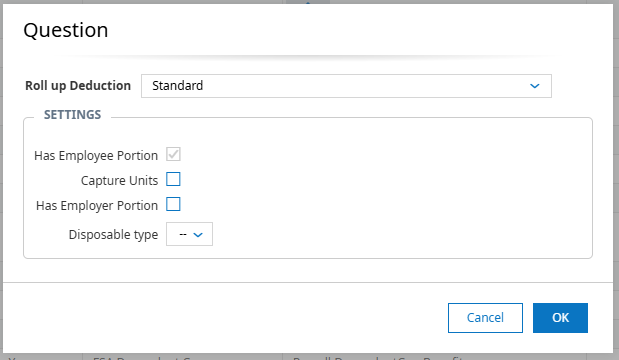
- Review the lists, General Ledger, and EIN settings of new deduction codes
- Custom Taxable Fringe Earning code(s)
-
- You will need separate codes for all affected benefits (i.e., medical, dental, vision)
- Earning codes can be added in the system under Settings > Payroll Setup > Earning Codes
- Click Add New Earning Code on the top right
- Use the Custom Taxable Fringe roll-up type
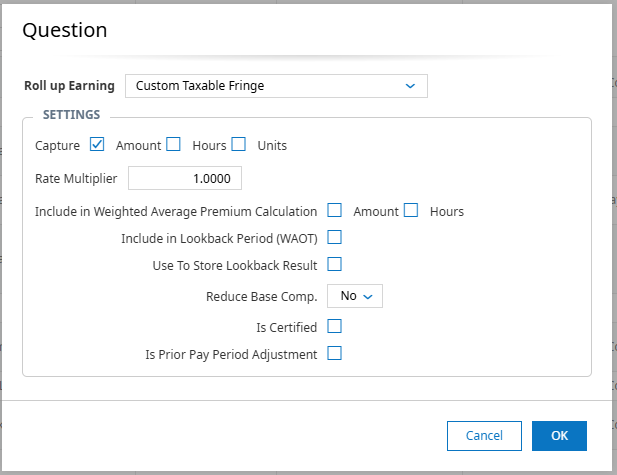
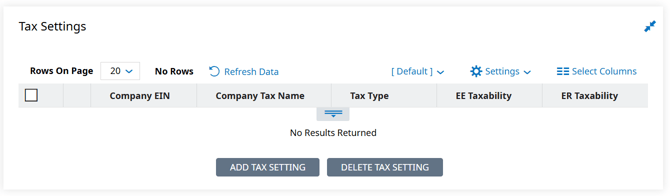
- Custom Taxable Fringe earnings will require all tax settings to be manually added. Click on Add Tax Setting, choose the taxability, and select the tax codes
- Review the lists, General Ledger, and EIN settings of new earning codes
Updating Employee Profiles
Employee profiles need to be updated so that the deductions and fringe earnings are calculated on a per-pay-period basis. Set up details and instructions for each can be found by clicking on the links below.
- Automated Configuration: will leverage enrollment questionnaires and separate benefit plan structures to automate
- Higher upfront configuration effort
- Lower ongoing administrative burden
- Greater consistency and scalability
- Requires plan creation and annual maintenance
- Manual Administration: avoids building separate benefit plans and instead relies on manual payroll and benefit adjustments for each affected employee
- Minimal advanced configuration effort
- Greater ongoing administrative involvement
- Increased risk of incorrect payroll earnings and/or deductions for applicable employees
- Increased reliance on procedural controls
- Requires employee-level adjustments at all enrollment events and annually
