![FUSE-workforce-management-logo.png]](https://www.fuseworkforce.com/hs-fs/hubfs/fuse-website/FUSE-workforce-management-logo.png?height=40&name=FUSE-workforce-management-logo.png)
Things to Keep in Mind
Here are the basics of what needs to be updated in the system. For more information, please review our Domestic Partner Handling Knowledgebase Article.
| Component | Tax Treatment | Payroll Action |
| Employee's share for eligible dependents | Pre-Tax | Regular Section 125 pre-tax deductions used |
| Employee's share for domestic partner | Post-Tax | Separate post-tax deductions used |
| Employer's share for eligible dependents | Nontaxable | None (use employer portion of regular pre-tax deduction for reporting purposes only) |
| Employer's share for domestic partner | Taxable Fringe | Imputed income paid as a Custom Taxable Fringe earnings code |
- You will need the Fair Market Value of the coverage for a domestic partner or a domestic partner's children who do not qualify as tax dependents.
- You will need both the employee and the employer portions broken out.
- You may need to work with your broker for this information.
- Keep in mind that all settings updated manually in these steps will need to be manually adjusted during any new-hire enrollment, open enrollment, or life change event.
- There are also options for automating the manual steps outlined. Review this article to learn more about automation settings.
Override Pretax Deductions
Pretax deductions should be automatically populating with the regular benefit enrollment, but they will need to be adjusted to no longer include the amount of post-tax premiums the employee will be contributing for their domestic partner benefits.
- Navigate to Team > My Team > Employee Information and select the employee you wish to edit
- Go to their Payroll Tab and the Deductions widget
- You can edit the cafeteria plan deduction by clicking on the name inside the deductions widget.
- In the settings area, you will see an Override Amount checkbox, and marking this checkbox will allow you to change the pretax deduction amount to only include the employee and their eligible dependents
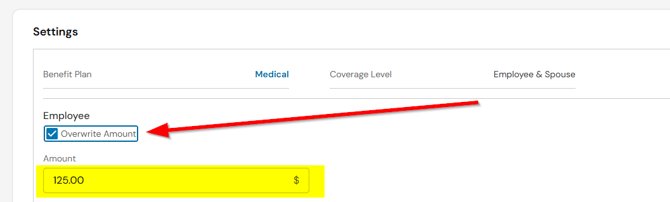
- This process must be completed for all cafeteria plan deductions that include domestic partner coverage.
- Keep in mind that all settings updated manually in these steps will need to be manually adjusted during any new-hire enrollment, open enrollment, or life change event.
Add Post-Tax Deductions
The post-tax deductions will need to be manually added for the employee's share of the domestic partner premium.
- Navigate to Team > My Team > Employee Information and select the employee you wish to edit
- Go to their Payroll Tab and the Deductions widget
- Click on the ellipses on the top right and choose New Deduction
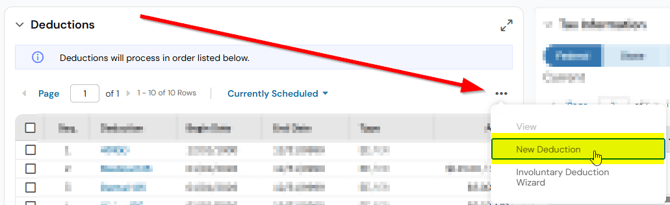
- Select the post tax deduction code for the specific benefit you are adjusting
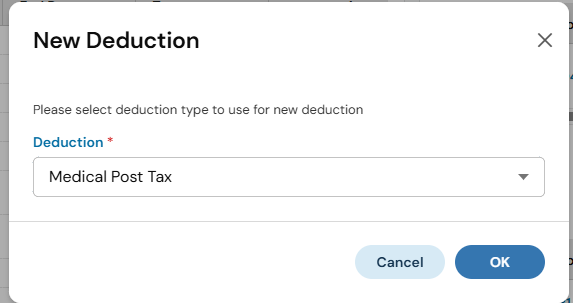
- If you do not see the post-tax options available, you will need to review our Domestic Partner Handling article for instructions on adding these.
- Enter start/end dates as necessary. Enter the employee's share of the domestic partner premium in the amount field.
- Click Save & Add
- This process must be completed for all cafeteria plan deductions that include domestic partner coverage.
- Keep in mind that all settings updated manually in these steps will need to be manually adjusted during any new-hire enrollment, open enrollment, or life change event.
Add Custom Fringe Earning
Custom Fringe earnings amounts will need to be entered for the employer's share of the premium that is paid on behalf of the domestic partner benefits. This will add the imputed income to the employees' wages each payroll period.
- Navigate to Team > My Team > Employee Information and select the employee you wish to edit
- Go to their Payroll Tab and the Earnings widget
- Click on the ellipses on the top right and choose New Earning
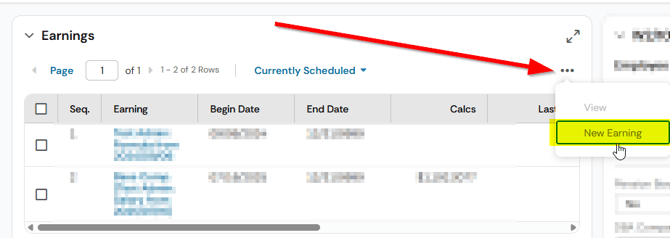
- Select the Custom Taxable Fringe earning code for the benefit you are adjusting
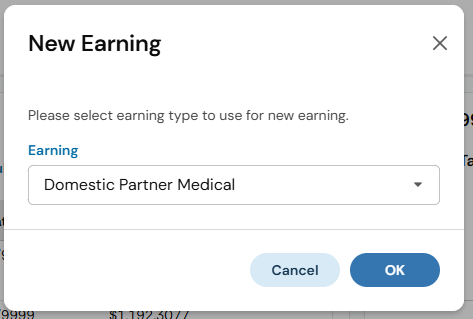
- If you do not see the domestic partner options available, you will need to review our Domestic Partner Handling article for instructions on adding these.
- Enter start/end dates as necessary. Enter the employer's share of the domestic partner premium in the amount field.
- Click Save & Add
- This process must be completed for all cafeteria plan deductions for which the employer is paying for a portion of domestic partner benefits.
- Keep in mind that all settings updated manually in these steps will need to be manually adjusted during any new-hire enrollment, open enrollment, or life change event.
