![FUSE-workforce-management-logo.png]](https://www.fuseworkforce.com/hs-fs/hubfs/fuse-website/FUSE-workforce-management-logo.png?height=40&name=FUSE-workforce-management-logo.png)
Proposal Report Features
-
Navigate to the Proposals report under Team > Compensation > Proposals
- This report shows all compensation proposal data, but it also has most of the employee HR fields available in the system. It can show all proposal/worksheet data, as long as any data is entered, regardless if it is submitted, approved, or finalized.
- From this report, any worksheets that are currently pending your approval can be mass-approved by selecting the checkboxes and clicking the Mass Approve button on the top right.
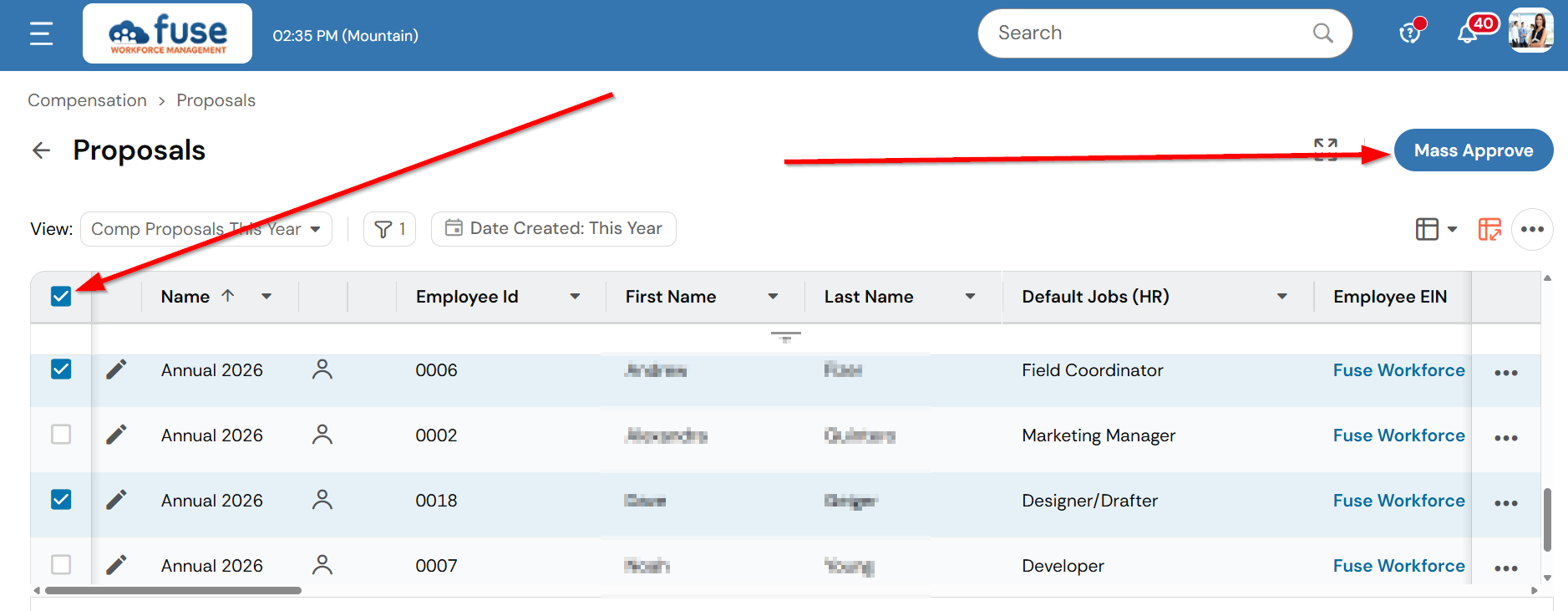
- This report is also where the worksheet submission starts. View our Knowledgebase Article for more information on submitting compensation worksheets.
- You cannot modify or reject submitted worksheets from this report. View our Knowledgebase Article for more information on mass modifications and rejections.
Helpful Columns
Here are some of the most commonly used columns to help with your review:
- Compensation Specific Columns
-
Proposal Columns: Proposal Salary, Pay Change Type X % Increase (where X is 1, 2, or 3, based on the pay type row in your Compensation Cycle), Proposed Pay, Proposed Hourly Pay
- Last Increase Effective From, Last % Increase
- Compensation Cycle: Name
-
- Workflow Columns
- Workflow Status
- Button: View Workflow (to view the full workflow and current approver)
- Approver Name (for the name of the last person to approve)
- Employee Defaults
- Cost Centers or Departments
- Jobs (HR): Name
- Manager Names
