![FUSE-workforce-management-logo.png]](https://www.fuseworkforce.com/hs-fs/hubfs/fuse-website/FUSE-workforce-management-logo.png?height=40&name=FUSE-workforce-management-logo.png)
Things to Know Before Finalizing
- Finalization is the last step of the Compensation workflow, and is usually completed by an administrator or a cycle manager. Compensation cycles cannot be finalized unless they have reached the finalize step in the workflow by the appropriate individuals. View the current workflow status to know if the individual employee/worksheet is ready for finalization.
- The finalization step is when the compensation data will automatically update employee profiles. Any information that employees can view on their profiles (base compensation, scheduled earnings, etc), will be visible upon finalization.
How to Finalize
-
Navigate to Team > Compensation > Proposals to Finalize
-png.png?width=1063&height=335&name=260225%20M%20FuseDemo1%20Compensation%20Proposals%20to%20Finalize%20(Article%204%2c%20Step%201)-png.png)
- Click on the pencil icon for each Compensation Cycle ready for finalization
- This report has a Proposals To Finalize column that shows the number of proposals ready for your finalization within each cycle
- Only worksheets that are ready for finalization will show up in each pencil. If an individual employee is not visible, this means their worksheet is not on the finalization step of their compensation workflow
- This report shows all pending employees on this cycle who are ready for finalization. This report includes some basic override options, such as the effective date of the compensation change.
- Once the data is ready to populate the employee profile, select the checkboxes and click the Mass Finalize button on the top right.
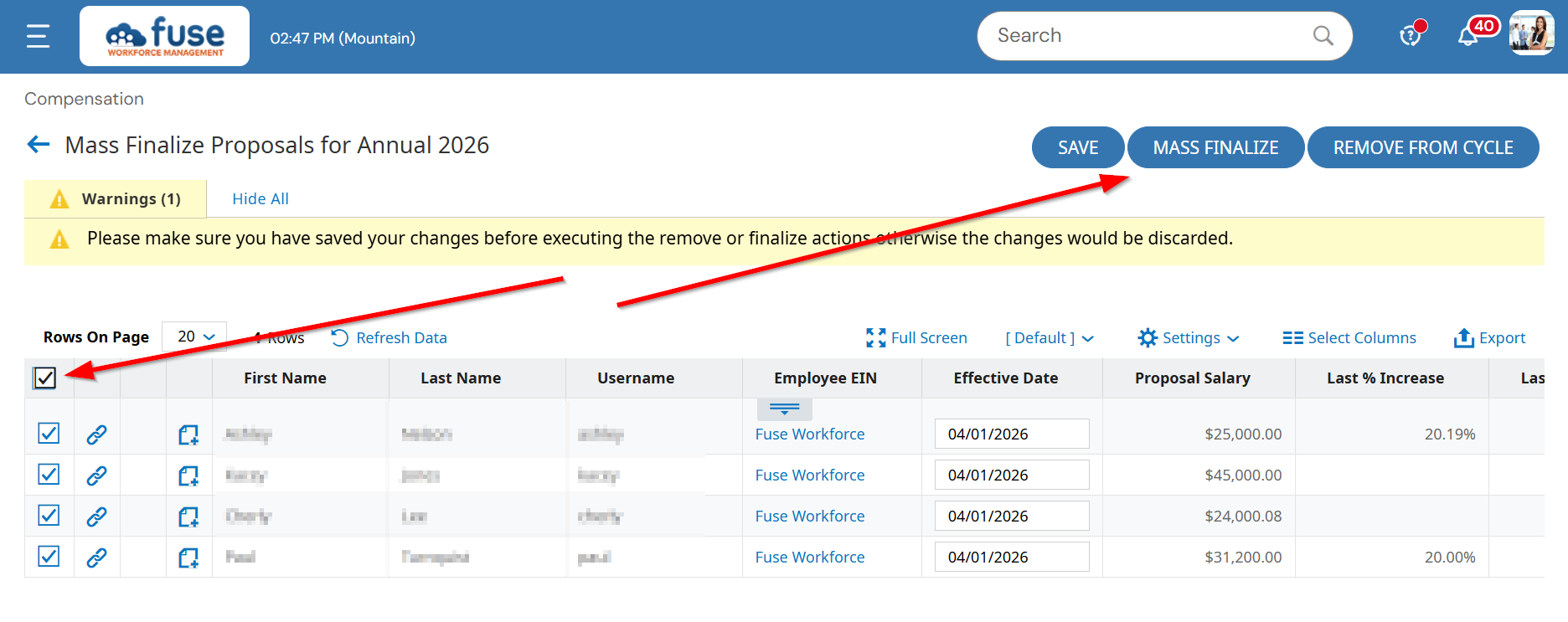
- If you would rather remove the employee from the cycle instead of finalizing this compensation, select the checkbox by their name and choose the Remove From Cycle button, instead.
- A Super Admin can also finalize proposals on the All To Do Items Report (My Info > My Reports > System Reports > System Utilities > All To Do Items)
